The PFC (Like all elnet products) has an automated swap of the current line – to solve mistake of wiring (L<->K).
So – when using generator it automatically set the sign to be correct.
You can use the PFC in generator without any problem.
Normally user decide NOT to use the PFC in generator mode. In this case you can use the different SetPoint by using Digital in – so when the generator is on (it switch digital in) – and you choose a lower setpoint in this mode – and the PFC will stop to connect capacitors.
Elnet can handle up to 3 simultaneous clients over MODBUS IP.
Use our Elnet Points Mapping software and then you can combine up to 100 points from all channels in a single modbus field. After doing this you can read up to 40 points in 1 read over modbus tcpip.
You should use IP and ID – ID number is coresponding to serial address (default 31)
Channel 1 ID is serial address (31)
Channel 2 ID is serial addres+1 (32)
….
Channel 12 ID is serrial address + 11 (42)
You can also use our elnet point mapping tool, where you can map 100 points from different channels together – see download section Elnet Software
For example: … I have installed an Elnet Meter LT (for example, applicable also on other Elnet devices).
The voltage and currents are absolutely correct – I have also checked them with an clamp ammeter (current pliers).
However, when I observe the measuring results, something strange is happening:
Cos Fi and Reactive energy appear to be incorrect.
There must be something wrong with the Elnet meter….
Solution: In 99,99% of cases the wiring is incorrect. Check again the wiring. The voltages (V1, V2, V3) should be aligned with the currents (L1, L2, L3). The most common situation is that there is a mix in the connection. For example: Voltage V1 has the Current L2 and Voltage 2 has the Current L1. Therefore the devices calculates wrong results.
The wiring should be absolute correct. To check it run also the Wiring test. Go to Technical menu and type in the code 11. Everything should be OK.
Yes. Every device is calibrated in the factory as a part of the end quality testing. Every device is delivered with a calibration certificate that is a result of this testing.
There are to types of mounting: on the DIN rail and panel mounting. In every case are no special requirements are needed. In case of panel mounting the door of electrical cabinet is cutted an opening with the dimensions: 90mm X 90mm
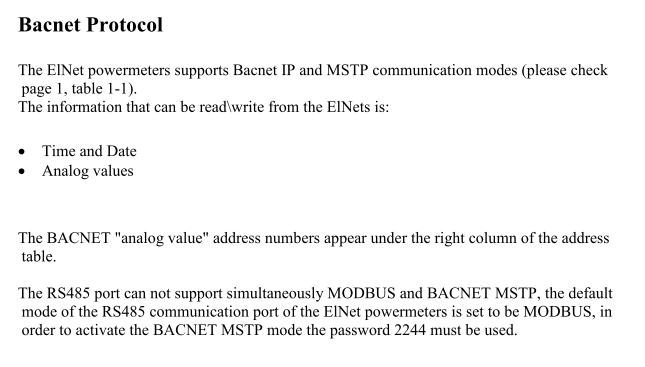
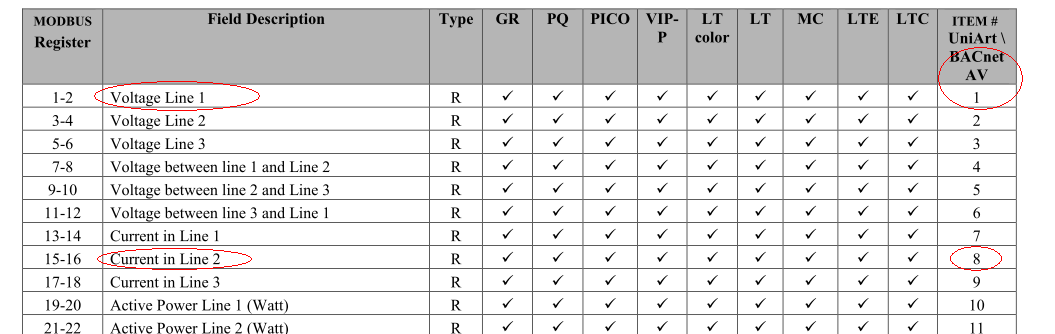
The regular way is over the Menu with the help of the buttons and the display. The ratio can be set also over communication. Both can be programmed over the Modbus&Bacnet communication protocol. For Example: The Current transformer ratio register is on the Modbus registers 95-96 , the Voltage transformer registers are on the registers 185-186. The procedure is described in the document: Elnet comm in the download section.
The frequency is 1600 samples per cycle. The meter displays the changes on every second. Over the communication the changes can be read every 0,5 seconds.
The ElNet Energy & Powermeter is capable of supporting either Function 03 or Function
04 Message Format(See Table 1-3). In a reply to a query from the PC master for a reading from
a particular field, the response from the Powermeter can be either in Format 03 or Format 04 but
will depend on which Format the qeuery was originally sent.
The difference is significant because by using Function 03 the ElNet will only send the
INTEGER part of the field value requested and the PC master will only display the INTEGER
part of the field value.
Function 04 on the other hand, is capable of sending two separate halves of the full FLOAT
requested information (each half contained in a separate register). Then it is the task of the PC
master to merge the two halves into a full FLOAT reply. (For more detailed information See
IEEE Standard 754 Floating-Point).
E.G. 1 If the user’s PC master supports Function 03, then the reply will contain the INTEGER
part of the field only.
The PC master requests the Voltage from Line1, and the actual Voltage in that field is
230.5 Volts.
Function 03 will respond with the INTEGER only i.e. 230V.
E.G. 2 If the user PC master supports Function 04, then the reply will contain the information
stored in the two registers asssigned to that field and will contain the full, accurate reply.
The PC master requests the Voltage from Line1, and the actual Voltage in that field is
230.5 Volts.
Function 04 will respond with a composite reply of both register 1 and 2 giving the full
FLOAT value (in IEEE Format) from that field i.e. 230.5V.
Acc Energy: setting which allow to chose between two accumulating energy modes Signed/Absolute. Signed mode, positive energy sign accumulate into import and negative energy sign accumulate to export. Absolute mode, all the energy accumulates to the import.
Alarm On Button: Red ball mark appears at the left buttons side in case this option is activated.
M2 On D.In: Activate the secondary meter to accumulate energy depending on digital in status.
Demand Cycle: Set demand cycle time to be 1, 2, 3, 4, 5, 10, 15, 20, 30 or 60 minutes.
Demand Type: Set demand calculation type to be Sliding window, Block or Thermal.
Demand Sync: Set demand synchronization type to be None, by D.In1, by Communication or by the Clock.
Date Format: Set date presentation format dd/mm/yy, mm/dd/yy, yy/mm/dd, mm-dd-yy or yy-mm-dd.
DIN Energy: Activate the digital in energy pulse feature.
NO Calc CT 0: present only the “real” measuring value from the current transform.
Led Power Save: Set after a while (minutes) the screen will enter power-save mode
Pre-Paid Energy: Activate prepaid meter mode.
Measuring VL-L: Force measuring the voltage between lines and ignore from theneutral line.
Hide Password: hide the password characters.
Calculate Cur. L0: Force calculating the current in neutral line (for LTP module).
SunSet Output: Digital out closed depending on the sunset settings.
Fast D.In: Activate the fast digital in mode (special hardware).
Cur no volt: In our meters, in order to receive a current reding, you must connect the voltage line, if you choose that option, you’ll receive current reading, even the voltage lines are disconnected.
No Min – Max: If you choose that option, the minimal and maximal value dissapear from screen.
Arom mssr VL3: if you connect aron connection, and if you choose that option, you must connect Line 3.
Meter roll over: you choose the reset point of the energy counter.
The shortest energy pusle setting is 0.1 sec. This mean 100ms pulse on/ 100ms pulse off. Models LT, LTP are so capable of max 5 energy pulses per second.
How to set up the energy pulse is explanded in user manual.
The Elnet MC has an adjustable current transformer rate. This means you can connect to the device any current transformer xxxA/5A ratio. The Elnet MC-60 has this rate fixed and can not be changed It is designed only to work with special mini CT. The Elnet MC-0,33 can be used with special mini 0.33V current transformers xxxA/0.33V.
This is the model Elnet MC. It is a state of the art multi channel solution that is unique on the market. It has 12 cannells and every chanell can measure up to 3 lines. So all together this means 36 lines. Modbus communication comes as standard also the TCP/IP port. The device has also a colour screen.
For sure this is the model Elnet LT. If you choose the model Elnet LT TCP/IP you can plug it into LAN computer network, set the IP address, mask, gateway and start immediately connecting from any browser trough the internet. Also the version without TCP/IP is available, the Elnet LT that has RS485 communication port.
If there is need to measure also leakage currents we recommend the sister model Elnet LTP. It comes also in two versions: Elnet LTP RS485 and Elnet LTP TCP/IP.
Model LTP, LT has 2 digital inputs 230V and can “read” 230V AC pulses at frequency 1 Hz or 200V DC at frequency 50 Hz, so you need an adapter to be able to connect water or any other pulse meter to LTP.
You must enable option DIN Energy option under Technical menu – Option in order to use this function. Energy is then shown Under Energy View – D.Input Energy, where you can set k1 and k2 factor (pulse weight).
Go to the Download page. There you will find specific Manuls for each device. For questions related to communication take a look in the Elnet Comm manual.
Our Website uses cookies to improve your user experience. Please visit our Privacy @ Cookies Policy page for more information about cookies and how we use them.